Insights
Your Google Business Profile: What It Is, Why It Matters, and How to Keep It Working
This article covers what it actually is, why it matters, and what you should be doing with it on a regular basis.
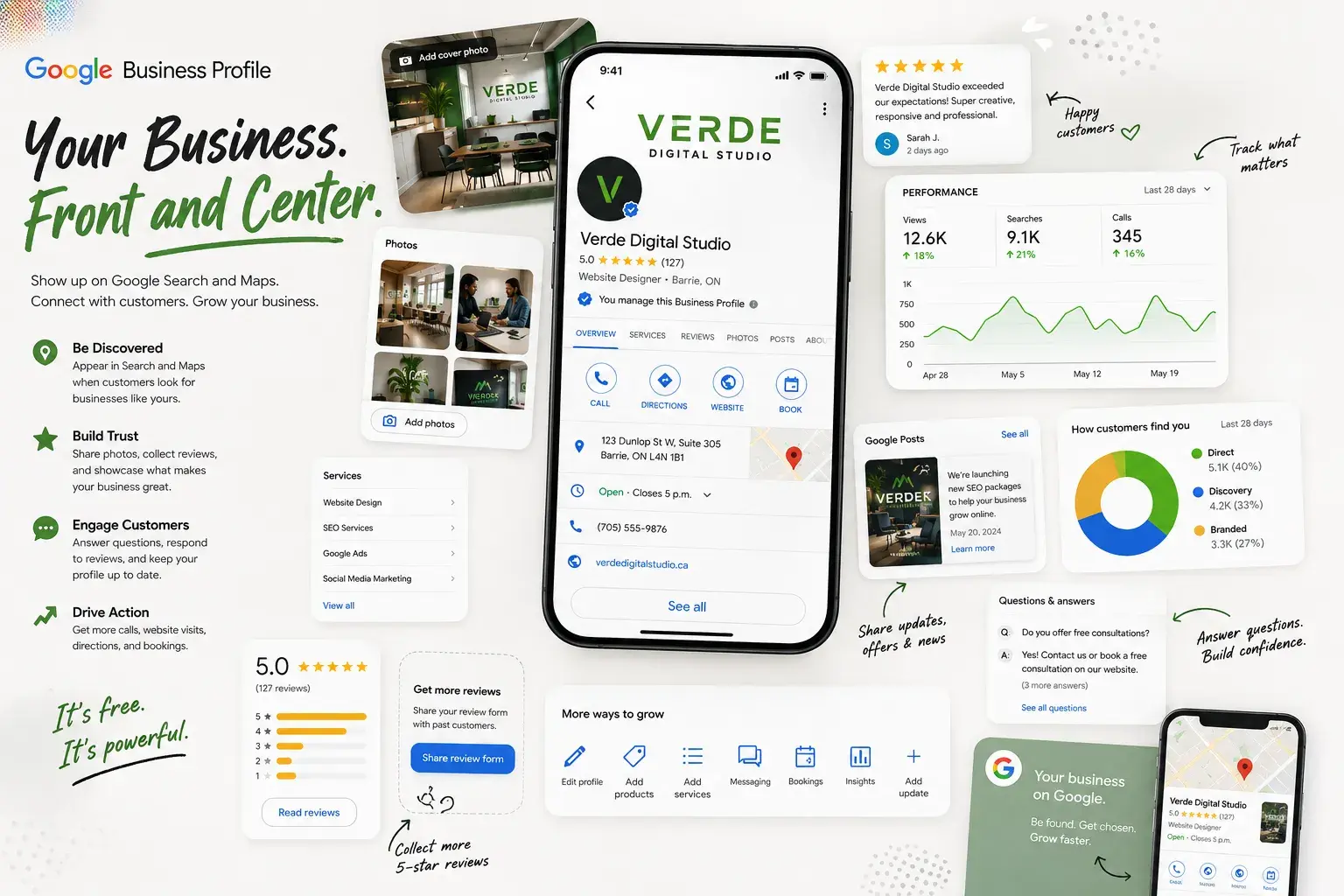
It’s free, it’s more powerful than most business owners realize, and a surprising number of businesses either don’t have one or haven’t touched it since they set it up.
Do a quick Google search for your own business. What comes up? If there’s a panel on the right side of the screen (or near the top on your phone) showing your business name, address, hours, phone number, photos, and reviews, that’s your Google Business Profile. If nothing comes up, or if what comes up has wrong information, outdated hours, or zero photos, it’s a problem worth fixing ASAP.
This article covers what it actually is, why it matters, and what you should be doing with it on a regular basis.
Google Business Profile
Google Business Profile (sometimes Google My Business, its old name) is a free tool that Google provides to businesses to manage how they appear in Google Search and Google Maps. It costs nothing, takes a few hours to set up properly, and has a measurable effect on whether potential customers find you, trust you, and contact you.
What Is a Google Business Profile, Exactly?
When someone searches for a type of business near them, say “plumber Barrie” or “dentist near me”, Google typically shows two types of results:
- The standard search results list; and,
- A section called the Local Pack. The Local Pack is the block with a small map and a short list of nearby businesses, usually three of them, that appear near the top of the page.
Getting into that Local Pack is one of the most valuable things a local business can do online. It puts you in front of people who are actively looking for what you offer, often when they’re ready to make a decision. According to recent data, businesses in those top local positions capture around 40% more conversion actions than businesses listed below them.
Your Google Business Profile is what drives that listing. It tells Google your business name, category, address or service area, phone number, website, hours, and a whole range of other details. It also collects and displays your Google reviews. The more complete, accurate, and active your profile is, the better Google understands your business and the more likely it is to show you to people searching for what you do.
One important clarification: a Google Business Profile is not your website. They’re separate things. Your profile lives on Google and points to your website. Both matter, and they work better together than either does alone.
Why It Matters More Than Most Businesses Realize
The numbers around Google Business Profile are worth paying attention to, because they change how you think about it.
According to BrightLocal’s research, 81% of consumers use Google to find local business reviews. Not Yelp. Not Facebook. Google. That means the reviews sitting on your Google Business Profile are almost certainly the first ones a potential customer reads before deciding whether to call you.
Research from newmedia.com found that profiles with complete information generate about twice as many customer actions as incomplete ones. Separately, around 42% of Google Business Profile conversions come from users who never visit the company website at all. They find you on Google, read your reviews, check your hours, and call you or get directions, all without clicking through to your site. That’s a significant portion of your potential customers making a decision based entirely on what they see on your profile.
There’s also the question of trust. Google removed over 170 million fake reviews in 2025, a 38% increase over the previous year, which tells you how actively it is working to make reviews more reliable. Consumers are paying attention to this too: 71% of consumers say they would not consider using a business with an average rating below three stars, and 88% say they would use a business that replies to all of its reviews.
That last stat is the one most businesses neglect. It’s not just about having reviews. It’s about being the kind of business that responds to them.
Managing a Google Business Profile properly takes time. If you’d rather have someone handle it as part of a broader SEO strategy, that’s something we take care of for our clients. You can read more about our SEO services or get in touch to talk through what your business needs.
Setting It Up: What You Actually Need to Do
If you don’t have a profile yet, you can create one at business.google.com. If one already exists but you haven’t claimed it, Google may have created a basic listing for your business automatically, you can claim it through the same place.
Once you’re in, here is what needs to be filled in:
-
Business name and category
Your name should match exactly how it appears everywhere else: on your website, on your invoices, on other directories. Your primary category is one of the most important ranking factors in local search. Choose the one that best describes what you actually do. Google offers hundreds of options, so it’s worth spending a few minutes finding the most specific and accurate fit rather than defaulting to something generic. -
Address or service area
If customers come to your physical location (a storefront, office, etc.), add your address. If you go to them (a plumber, a landscaper, a mobile service), set a service area instead and keep your home address private. If you do both, you can add a service area alongside your address. -
Phone number and website
Use the same phone number you list everywhere else. The website field should point to your homepage or, in some cases, a specific landing page if you have a multi-location setup or you’re targeting hyperlocal website traffic. -
Hours Keep these accurate
Wrong hours are one of the fastest ways to frustrate a potential customer who shows up when you’re closed. Don’t forget to update them for holidays. Google allows you to set special hours for specific dates, which is worth doing if your hours change seasonally or around major holidays. -
Business description
You have 750 characters to describe what you do. Write it for a person, not for an algorithm. Explain who you help, what you offer, and what sets you apart. Avoid stuffing in a list of keywords. Google can tell the difference, and so can the person reading it. -
Photos
This is the area most businesses neglect most. Profiles with real, regularly updated photos consistently outperform those without. Research suggests businesses with 100 or more photos receive around 35% more website clicks than businesses with minimal imagery. You don’t need 100 photos on day one, but a handful of genuine photos of your space, your work, your team, and your products goes a long way. Stock photos should only be a last resort. Real photos are always better and yes, Google can tell the difference. Unique photos are rewarded, stock images, which Google is already aware of, are penalized. Update your photos every few months. Profiles with photos refreshed every 90 days earn roughly 22% more engagement than those that go stagnant. -
Services and products
Google allows you to list your services individually, each with a description. This is underused and worth doing. It gives Google more to work with when matching your profile to relevant searches, and it gives potential customers a clearer picture of what you actually offer.
Reviews: The Part You Cannot Afford to Ignore
Reviews are one of the most heavily weighted factors in local search rankings. They also directly influence whether a customer chooses you over the business listed next to you. Both of those things are true at the same time, which makes them worth taking seriously.
The data from BirdEye’s 2026 State of Google Business Profile report is striking: a single additional review can generate, on average:
- over 600 additional search impressions
- 80 more website visits
- 63 more direction requests
- 16 more phone calls.
Those are averages across industries, and results vary, but the directional point stands: reviews compound.
Getting more reviews is mostly about making it easy to ask. Google provides a short link you can share with customers that takes them directly to your review page. Sending that link after a completed job, in a follow-up email, or on a receipt is the simplest and most effective approach. Do not offer incentives or discounts in exchange for reviews. Google prohibits it, and customers have gotten good at spotting it.
Responding to reviews
This is where a lot of businesses fall short. BrightLocal’s 2026 research found that 89% of consumers expect a response to their reviews, and 19% now expect a response on the same day. That is up from 6% the previous year. Expectations are rising.
For positive reviews, a short, genuine response is enough. Thank them by name if you can, mention something specific about their experience, and keep it human. A copy-and-pasted thank you on every review will be penalized.
For negative reviews, deep breaths first. Respond calmly, acknowledge the experience without getting defensive, and where possible, offer to resolve it offline. Future customers read your responses as closely as they read the reviews themselves. A thoughtful response to a negative review can actually improve your credibility rather than damage it.
What you should not do: argue, get sarcastic, or post a lengthy defence. The internet has a long memory.
Keeping It Active: What ‘Maintenance’ Actually Looks Like
Google Business Profile is not a set-and-forget tool. Google treats an active, regularly updated profile as a sign that the business is alive and engaged. A profile that hasn’t been touched in a year sends the opposite signal.
The good news is that maintaining a profile doesn’t take much time once the initial setup is done. Here is what regular upkeep looks like in practice:
Posts
Google allows you to publish short posts directly to your profile, similar to a social media update. These can promote an offer, announce an event, highlight a service, or share a piece of useful information. Posts appear on your profile and can show up in search results. They don’t need to be long or elaborate. A short paragraph and a photo, posted every couple of weeks, keeps the profile looking current.
Ask Maps and AI-generated answers
Google recently removed the Q&A section from Business Profiles and replaced it with an AI-powered feature called Ask Maps. Instead of a static thread of questions and answers, Google now uses Gemini to generate responses to customer questions in real time, pulling from your profile details, your reviews, your photos, and your website. You no longer manage it manually. The catch is that if your profile information is incomplete, outdated, or vague, the AI will still generate answers. Just not necessarily accurate ones. Keeping everything on your profile current is the best way to make sure Google is telling people the right things about your business.
Keeping information current
Hours change. Phone numbers change. Services get added or dropped. Every time something changes at your business, your Google Business Profile should be one of the first things you update. Inaccurate information frustrates customers and reduces how much Google trusts your listing.
Watching for suggested edits
Google allows anyone to suggest edits to your business listing. Members of the public can propose changes to your hours, phone number, or even your business category. Google sometimes applies these changes automatically if it thinks they are accurate. Log in to your profile every few weeks to check that nothing has been changed without your knowledge. This is rarer than it sounds but it does happen, and an incorrect phone number or address sitting on your profile without your realizing it is not a great situation.
One More Thing: AI Is Paying Attention to Your Profile Too
If you have asked ChatGPT or a similar AI tool to recommend a local business recently, you may have noticed that it sometimes returns specific business names, ratings, and reviews. This is becoming more common. BrightLocal’s 2026 survey found that 45% of consumers now use AI tools for local business recommendations.
These tools pull from publicly available data, including Google Business Profiles. A complete, accurate, well-reviewed profile is more likely to be surfaced by these tools than an incomplete or neglected one. This is not a reason to panic or do anything dramatically different but it is another reason to keep the profile in good shape.
Your Google Business Profile is one of the most practical and cost-effective things you can do for your local search visibility. Set it up completely. Keep the information accurate. Add photos regularly. Ask for reviews. Respond to all of them. Post occasional updates. Check in every few weeks to make sure nothing has gone sideways.
None of those tasks are technically demanding. The businesses that do them consistently show up more often and convert better than the ones that don’t. It really is that straightforward.
If you want help managing your profile as part of a broader local SEO strategy, we can take care of it. Take a look at our SEO services or, if your website also needs attention, our web design work is built with search performance in mind from the start. Both make a difference, and they work better together.